APIs and MQTT, at home on the Mac.
Abruf is a native client for HTTP APIs and MQTT brokers. Send a request, watch a stream, chain a sign-in into the call that needs it. It all runs on your Mac, with no account and no server of ours in between.
Coming soon to the Mac App Store. Free to try for 14 days.
For macOS 26 and later.

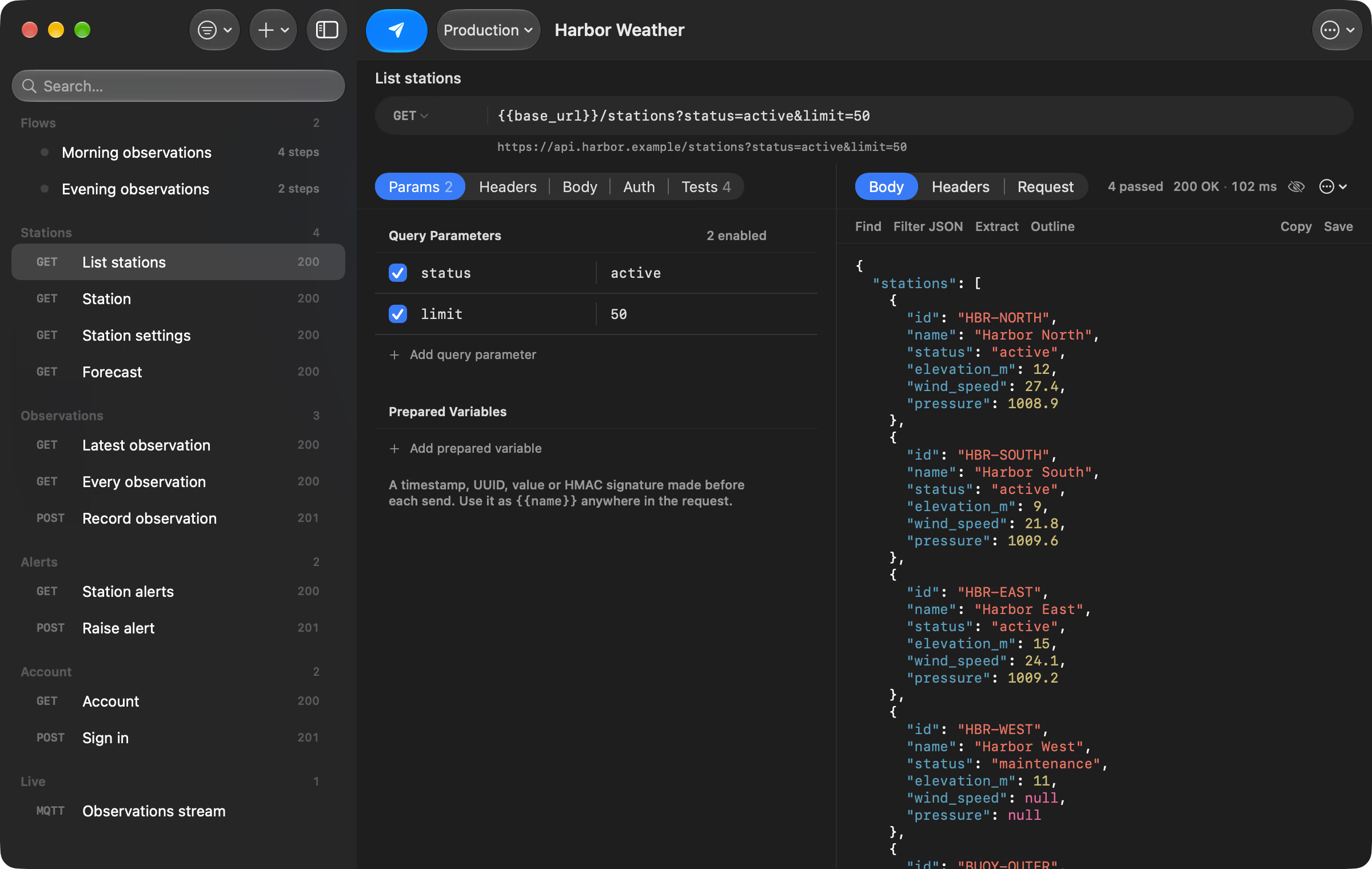
Send anything. Check the answer in plain sentences.
Send any method with a JSON, form, multipart or raw body. Sign in with OAuth 2.0, a bearer token, Basic or an API key, set once on a collection and inherited by everything inside it. Tests sit beside headers and parameters, and editing one checks it again against the response already on screen.

Listen to a broker. Get told when a field changes.
Subscribe to topic filters, publish with QoS and retain, and narrow the stream to one filter while everything else keeps arriving. A watch sends a notification when a value changes, crosses a threshold or becomes something specific. Abruf speaks MQTT 3.1.1 over TCP, TLS and WebSocket, reconnects by itself when the link drops, and signs in to AWS IoT with your AWS profile, access keys or a client certificate.

Chain your requests. Each one hands its result to the next.
Pull a token out of one response with jq and hand it to the next request. A step can wait, run only when the last one succeeded, or carry on after an error. And when a token expires mid-session, Abruf can run your refresh request and retry the call once.

Keep your hands on the keys. Everything is one ⌘K away.
The command palette finds any request, flow or command as you type, and shows what a request would send before you pick it. Return opens it and ⌘↩ sends it. Everything Abruf can do is in the menu bar as well, so nothing needs the pointer.

Your requests stay yours. No account, no analytics, no server in the middle.
Abruf is a Mac app and nothing more. There is no Abruf cloud to sign in to and nothing to sync through us. The privacy policy is short because there is little to say.
- Straight to your servers
- Requests go only to the servers and brokers you choose. Nothing passes through a server run by Abruf.
- Secrets in your Keychain
- Passwords, tokens and keys are kept in the macOS Keychain, which encrypts them, not in the workspace. A secret typed into a request body is flagged, with a one-step fix.
- AI that stays on your Mac
- Explaining a response, Send with AI and Run Flow with AI use Apple’s on-device model. What you ask about never leaves your Mac, known secrets are masked first, and every change the model suggests is shown to you before anything is sent.
- Workspaces as plain files
- A workspace is a folder of JSON in iCloud Drive or anywhere on your Mac. It is yours to keep, copy and read, with or without a purchase.
The details
- Requests
-
GET, POST, PUT, PATCH, DELETE, HEAD, OPTIONS and any custom method. JSON, multipart,
URL-encoded and raw bodies. Path parameters written as
:id. - Variables
-
Environments you switch between. A variable the active one doesn’t define, such as
a mistyped
{{base_ulr}}, is marked in red and underlined before you send. - Sign-in
- OAuth 2.0 with authorization code and PKCE or client credentials, bearer token, Basic and API key. AWS Signature Version 4 with an AWS profile you already have (SSO, an assumed role or access keys) or keys you enter, signed on your Mac. Client certificates for mutual TLS.
- Responses
- A JSON outline, find, a jq filter, a timing breakdown, image preview, and the last 20 responses of each request to compare.
- MQTT
- MQTT 3.1.1 over TCP, TLS and WebSocket with QoS 0 and 1, reconnecting when the link drops. Sign in with a username and password, a client certificate, an AWS profile or AWS access keys.
- jq
- A jq engine written in Swift and checked against jq itself, used for filtering, extracting values and tests.
- Import
- cURL commands, Postman collections (v2.0 and v2.1) and environments, OpenAPI 3 and Swagger 2.0. Abruf lists what it could not bring across.
- Export
- A collection, the whole workspace or an environment as a Postman file, with secrets exported empty.
- Copy as
- cURL, raw HTTP, JavaScript fetch, Swift URLSession, Python Requests and Go net/http, with credentials masked if you ask.
- Keyboard
- A command palette on ⌘K, search across the workspace on ⇧⌘F, and the full list under Help.
- Shortcuts
- Send a request, run a flow or open a request from Shortcuts and Spotlight. A response handed to a shortcut has its credentials masked.
- Accessibility
- VoiceOver, Increase Contrast, Reduce Motion and adjustable text size.
- Requires
- macOS 26 or later. On-device AI needs a Mac with Apple Intelligence turned on.
Try it free for 14 days. Or buy it once.
Abruf Yearly Recommended
$39.99 a year
Starts with 14 days free, then billed once a year. Cancel anytime. Your subscription keeps Abruf in independent development.
Abruf Lifetime
$99.99 once
One purchase. No renewal.
The free trial is the start of Abruf Yearly, and it begins when you choose. Cancel at least 24 hours before it ends and nothing is charged. Without a trial or purchase your workspaces, requests and saved responses stay available, while sending requests, connecting to brokers, running flows and AI features need one. Prices are in US dollars and vary by region.
Questions
What happens when the trial ends?
Unless you cancel it, the trial carries on as Abruf Yearly and $39.99 is charged to your Apple Account. If you cancel, Abruf keeps opening: you can browse, edit, search, import and export your workspaces and copy any request as cURL, while sending requests, connecting to MQTT brokers, running flows and AI features wait until you subscribe or buy Abruf Lifetime.
Can I try Abruf before buying Abruf Lifetime?
Yes. Start the free trial, and buy Abruf Lifetime whenever you like. Then cancel the trial in your App Store subscriptions, so Abruf Yearly doesn’t renew.
Do I need an account?
No. Abruf has no accounts. The trial and purchases go through your Apple Account in the Mac App Store.
Where is my data kept?
In a workspace folder in iCloud Drive or wherever you put it on your Mac. Secrets go to your Keychain, and response history stays on the Mac that received it.
Which MQTT brokers does it work with?
Brokers that accept MQTT 3.1.1, at an address starting with mqtt://,
mqtts://, ws:// or wss://, including AWS IoT
and brokers that ask for a client certificate. MQTT 5 is not supported.
Does it do GraphQL, WebSockets or gRPC?
Not as dedicated tools. Abruf is for HTTP and MQTT. A GraphQL query can be sent as a JSON body like any other request.
Can I bring my requests from another tool?
Yes. Abruf imports Postman collections, OpenAPI and Swagger documents, and cURL commands, keeping the order they came in. An import is one step to undo, and a collection can leave again as a Postman file.
Abruf
Coming soon to the Mac App Store. Free to try for 14 days.